Saturday, 29 March 2014

Kali Linux Gnome Desktop


I am always looking for interesting new developments in security analysis and penetration testing, and have been attending SANS Security conferences for a few years now, which has introduced me to several Linux distributions that I was not otherwise familiar with.
Initially the most popular was Knoppix, then focus moved to BackTrack Linux, and finally last year when it seemed that BackTrack might disappear,  Kali Linux picked up the torch.
Although I have always installed whatever Linux they were using in the class on my laptop, I never seemed to keep it for very long afterward. Something always came up - either they weren't flexible enough, or updates were too difficult, or they were just based on a Linux distribution which was too old to begin with.
I have also tried to put some of the tools we used in the classes on other Linux distributions, and while that sometimes worked I all too often found that the tools were difficult to install/configure/update, and they generally didn't last either.
So, when I read the Kali 1.0.6 release announcement, there were two things in it which really caught my eye.  First, it is now based on Debian 7 (Wheezy), and second, the Kali developers have made standard packages of all the tools included in it. I decided it was time to give it a closer look, in pretty much the same way that I look at any other Linux distribution, rather than waiting until I got to the conference this year.

Saturday, 15 March 2014

hack facebook account using security question

So here what you need to do is go to victims account you will find a address like http://facebook.harsh.31
So just copy thid harsh.31
Now go to login page and enter harsh. 31 for username and leave the password field blank and then make a fake email id facebook will ask this is ur account click on reset password you will now need to click on no longer access then u have to answer security question and the account is urs if u have any doubt just comment below

Saturday, 21 December 2013

Distributed Denial of Service Attack (DDoS) Part 1

DoS stands for “Distributed Denial of Service.” A DDoS attack is a malicious attempt to make a server or a network resource unavailable to users, usually by temporarily interrupting or suspending the services of a host connected to the Internet.

Unlike a Denial of Service (DoS) attack, in which one computer and one internet connection is used to flood targeted resource with packets, a DDoS attack uses many computers and many Internet connections,

DDoS attacks can be broadly divided in three types:

Volume Based Attacks – includes UDP floods, ICMP floods, and other spoofed-packet floods. The attack’s goal is to saturate the bandwidth of the attacked site, and magnitude is measured in bits per second (Bps).
Protocol Attacks – includes SYN floods, fragmented packet attacks, Ping of Death, Smurf DDoS and more. This type of attack consumes actual server resources, or those of intermediate communication equipment, such as firewalls and load balancers, and is measured in Packets per second.
Application Layer Attacks – includes Slowloris, Zero-day DDoS attacks, DDoS attacks that target Apache, Windows or OpenBSD vulnerabilities and more. Comprised of seemingly legitimate and innocent requests, the goal of these attacks is to crash the web server, and the magnitude is measured in Requests per second.

Specific DDoS Attacks Types

Some specific and particularly popular and dangerous types of DDoS attacks include:

UDP Flood – this DDoS attack leverages the User Datagram Protocol (UDP), a sessionless networking protocol. This type of attack floods random ports on a remote host with numerous UDP packets, causing the host to repeatedly check for the application listening at that port, and (when no application is found) reply with an ICMP Destination Unreachable packet. This process saps host resources, and can ultimately lead to inaccessibility.
ICMP (Ping) Flood – similar in principle to the UDP flood attack, an ICMP flood overwhelms the target resource with ICMP Echo Request (ping) packets, generally sending packets as fast as possible without waiting for replies. This type of attack can consume both outgoing and incoming bandwidth, since the victim’s servers will often attempt to respond with ICMP Echo Reply packets, resulting a significant overall system slowdown.
SYN Flood – A SYN flood DDoS attack exploits an known weakness in the TCP connection sequence (the “three-way handshake”), wherein a SYN request to initiate a TCP connection with a host must be answered by a SYN-ACK response from that host, and then confirmed by an ACK response from the requester. In a SYN flood scenario, the requester sends multiple SYN requests, but either does not respond to the host’s SYN-ACK response, or sends the SYN requests from a spoofed IP address. Either way, the host system continues to wait for acknowledgement for each of the requests, binding resources until no new connections can be made, and ultimately resulting in denial of service.
Ping of Death – a ping of death ("POD") attack involves the attacker sending multiple malformed or malicious pings to a computer. The maximum packet length of an IP packet (including header) is 65,535 bytes. However, the Data Link Layer usually poses limits to the maximum frame size - for example 1500 bytes over an Ethernet network. In this case, a large IP packet is split across multiple IP packets (known as fragments), and the recipient host reassembles the IP fragments into the complete packet. In a Ping of Death scenario, following malicious manipulation of fragment content, the recipient ends up with an IP packet which is larger than 65,535 bytes when reassembled. This can overflow memory buffers allocated for the packet, causing denial of service for legitimate packets.
Slowloris – especially dangerous to hosts running Apache, dhttpd, Tomcat and GoAhead WebServer, Slowloris is a highly-targeted attack, enabling one web server to take down another server, without affecting other services or ports on the target network. Slowloris does this by holding as many connections to the target web server open for as long as possible. It accomplishes this by creating connections to the target server, but sending only a partial request. Slowloris constantly sends more HTTP headers, but never completes a request. The targeted server keeps each of these false connections open. This eventually overflows the maximum concurrent connection pool, and leads to denial of additional connections from legitimate clients.
Zero-day DDoS – “Zero-day” are simply unknown or new attacks, exploiting vulnerabilities for which no patch has yet been released. The term is well-known hacker community, and trading Zero-day vulnerabilities that can be used in attacks has become a popular activity.

Tuesday, 13 August 2013

Hello, this little post will explain in rough details how you start hacking a specific target.

First. There are many different ways going about this, but this is one way.

Information gathering
The first thing you want to do when targeting a specific target is get as much information as possible before a front attack(if any, being quiet is much better)
Now this step can take ages if you really want a detailed level of knowledge. And if you are serious about hacking your target, you should be detailed here.
What sort of information do I look for you might ask yourself? Well, anything really. Anything surrounding the target and even things that surround things that surround your target. Here is a short list of things that might be useful;
IP(s), some machines/domains/systems or whatever have multiple domains
ISP(s), if small ISP(s), get owner details here as below
Owner. Email, name, location, family, hobby's, Facebook account, phone number
*Open ports. On ALL of the ips/servers if there are multiple
Service signatures, find out as much as possible about all the open ports, are they in use? What software are they running at the other end? Do the services reveal any other information about the system? OS? Internal IPS?
Hosters(In most cases there will be a hosting company)
Hosters information - Owner and all of that(If the company is small)
Hosters member system, how does the members login? Is there a login? Is there a forgot password function? Can you exploit the hoster instead?(might be easier in some cases)
DNS records(if any), subdomains? Hidden domains/info? DNS hosters? Same as above.
The physical server(s) location / datacenter
And the list goes on and on and on. Literally EVERYTHING about the company/system/server/target are relevant. The more info you got, the easier it will be attacking him/her/them/it.

You should decide if you want to target the system or the people of your target. That is, code/system flaws or human flaws(keyloggers, Trojans, social engineering, info gathering + password guessing, etc). This decision should depend on the information you find about your target. Both can be tried ofcourse, just make sure the target does not know you are trying to hack it, often one of the attempts will set off alerts.

This whole information gathering part might seem unnecessary, but really. Its neat, lets you put things in perspective so you can find the best point of entry.

The attack
Before an attack is lunched, there are a few things you need to think about. Here is a list of things you should think about;
Will this company/target rage crazy if I hack them? If so, check 3rd point.
Will police or other agencies be contacted if I hack them? If so, check 3rd point.
*Is my privacy good enough? Are you behind a proxy(s)? Should you? Do the proxy log?(It shouldn't)
Are they running any services at all? If not, you don't really have any virtual way in..
Are they running web applications? These are typically easier to hack than services. And have a higher percentage rate of flaws.
Do the target got a open router/switch/modem system? This often happens with home computers/networks.
Are your target running platforms with logins? These could be targeted.
Do you have enough time? Its a good practice to have time enough to do the entire attack in one go. Else you might fire off warnings for the target, and he can go into a bombshelter We don't want that now, do we?

Now there are tree ways of attacking in this guide.
- Service/software exploitation
- Web application exploitation
- Human factor exploitation

Service/software exploitation
Here you will exploit one or more services/programs running on the target system. In most cases, this will be called bufferoverflow. This can do everything from bypassing a login to give you instant shell access. In scenarios where the target is running services which is not a web server(can be tho) this might be the way to go.

Web application exploitation
This is without a doubt the most vulnerable field. Web applications are flawfull, 70% or so of all pages got some sort of web application flaw, this ofc may vary from an stupid XSS to a serious RFI. In scenarios where the target system are running a web server, this is the first thing to check. Do always check web applications before going on to service exploitation if you just want to get the target hacked.

Human factor exploitation
Now if all other things fail, there is ALWAYS a human factor. This can be social engineering the target to give you limited access, and you work your way up from there. Or simply tricking the target to trust you and in some strange way share his password, perhaps not for the system you are targeting, but for his email or an online account or whatever, stupid people tend to use the same password or the same password syntax everywhere. Keep in mind that the human factor doesn't necessarily have to be your targets owner, could be the hoster, the DNS hoster, the ISP, family.

Finale note
If you think its necessary, clear your tracks. If you ask me, if you can see that you have been there you didn't do it right. Take care, be safe.

Sunday, 11 August 2013

Artyom Zorin has announced the release of Zorin OS 6.2 "Lite" edition, an updated release of the project's Ubuntu-based lightweight distribution (with LXDE) designed for new Linux users: "The Zorin OS team has released Zorin OS 6.2 Lite, the latest evolution of the Zorin OS Lite series of operating systems, designed specifically for Windows users using old or low-powered hardware. This release is based on Lubuntu 12.04.2 and uses the LXDE desktop environment to provide one of the fastest and most feature-packed interfaces for low-spec machines. This new release includes newly updated software out of the box. We also include our innovative Zorin Look Changer, Zorin Internet Browser Manager, Zorin OS Lite Extra Software and other programs from our earlier versions in Zorin OS 6.2 Lite." Here is the brief release announcement.
zorin lite

Zorin OS Lite 6.2 is built on the Linux architecture so it is completely open source and it's based on Ubuntu, one of the most used Linux operating system in the world.
This latest version of Zorin OS Lite is still based on Lubuntu 12.04.2 (Precise Pangolin), which was released only a couple of days ago, and it uses the LXDE desktop environment.
Zorin Look Changer, Zorin Internet Browser Manager, Zorin OS Lite Extra Software and other programs from earlier versions have been added to Zorin OS 6.2 Lite.

Download (MD5) from here: zorin-os-6.2-lite.iso (650MB)


Linux Lite is free, stable, light and simple fully functional out of the box with complete set of applications, it is based on Ubuntu LTS (Long Term Support) releases and this distribution support period is 5 years. So you don't need to worry about to install new version after 1 or 2 years but you only need to install just once every 5 years. During these 5 years Linux Lite current version will get security and software updates.
It is also recommended to those people who are new to Linux or for those who want really lightweight desktop environment. It is also great choice for old laptop or desktop you gave up on a few years back. Linux Lite is a showcase for just how easy it can be to use Linux. From familiar software like Firefox and Thunderbird, to simply named menu items, to one click updates and software installs.

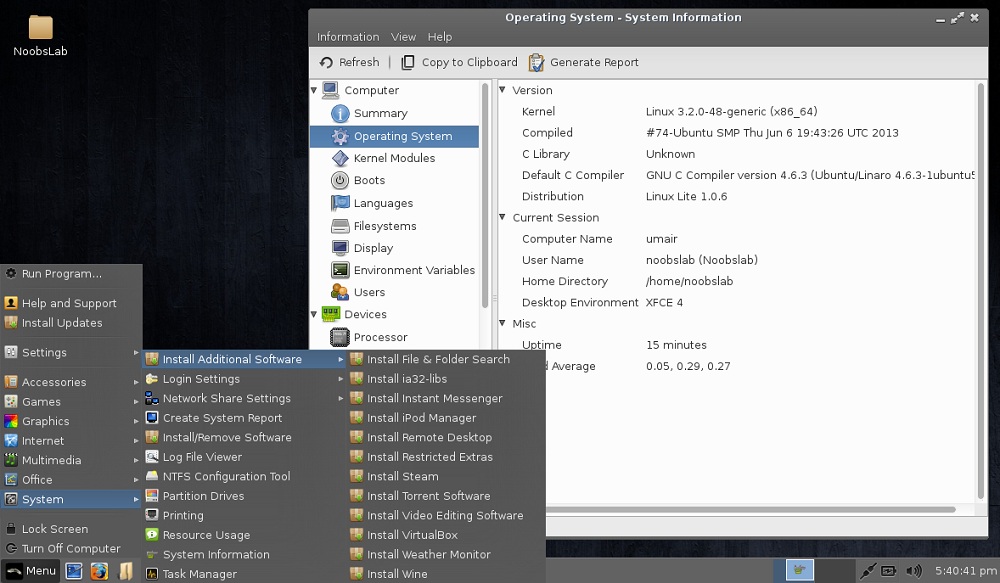
Linux Lite team just released 1.0.6 version for 32bit and 64bit with Xfce desktop environment, based on Ubuntu 12.04.
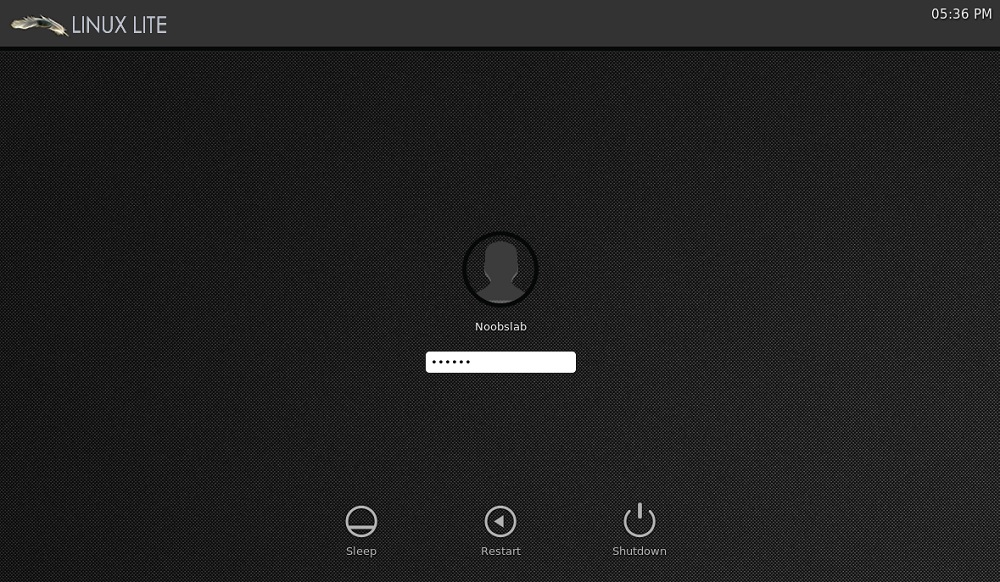
Linux Lite 1.0.6 new features include easier networking setup between Linux Lite and Windows or other Linux operating systems, a system report tool to help troubleshoot problems, support for scanners, Bluetooth and a brand-new login screen. The Help and Support Manual is our most comprehensive to date and is available both offline and online.

Changelog:
  • Firefox 21.0
  • Kernel 3.2.0.40 pae
  • Rewrote Help & Support Manual
  • Added Scanner support.
  • Added Bluetooth.
  • Added 'Drives' shortcut to home folder.
  • Added Show Desktop button.
  • Added support for iDevices.
  • Added right click 'Open as Administrator' to Thunar.
  • Added/Removed Install Additional Software scripts.
  • Added Enable/Disable automatic login to System menu.
  • Added Network Share Settings to System menu.
  • Added Create System Report to System menu.
  • Replaced Wicd with Network Manager.
  • New live boot menu.
  • New login screen.
  • New install slides.
  • Announcement of the Linux Lite Shop.
  • Fixed auto login if chosen during installation.
  • Bug fixes.
  • and So on...
Here is the brief release announcement.

Screenshots 
Boot Screen

Linux lite
Login Screen

Linux lite
Desktop

Linux lite
File Manager & Terminal

Linux lite
Additional Software & System Info Tool

Linux lite
Installed Applications & Application finder

Linux lite
Task Manager

Yahoo Messenger is one of the highly popular and most widely used instant messaging service in the world offering a wide variety of features to its users, all for free. This has made it the right choice for all those who are waiting to chat and communicate with their far away friends and relatives.
However, while some people use Yahoo Messenger only to chat with their friends and known ones, many others use it to have fun by joining the chat rooms and chatting with the strangers. If you’re a similar person who would like to have fun during the chat, this post if for you!
In this post, I will show you some really interesting Yahoo Messenger hacks using which it is possible to play pranks with your friends and strangers during the chat. Below is a list of some cool hacks that you’re sure to enjoy:

1. Chat with Multiple Names Simultaneously

How about chatting with your friend with two or more different names at a time? Well, do not think that this is impossible! This can easily be done with a simple workaround which enables you to chat with as many different names as you can with the same or different people.
For example, you may chat with Person-A using one name and with Person-B using the other. You can also chat with the same person using different names or any other combination. All of this goes really unnoticed by the user on the other side, while you are sure to have some real fun.
Here is a step-by-step procedure to implement this hack:
  1. Sign in to your Yahoo Messenger. From the top, click on Messenger -> My Account Info. You will be taken to a web page where you need to log in to your account.
  2. Now, you should be on the Profile Settings page. Scroll down to see the option Account Settings as shown below. From there, click on the link which says: “Manage your Yahoo! aliases”.
    Create Aliases in Yahoo
  3. From the Aliases page, click on: “Add an alias”. You can create as many aliases you want. Choose unique names for your alias and once you’re done, click on “close”.
  4. You need to sign out of Yahoo Messenger and sign in again to see the changes. Once you have done this, double-click on any name from your contact list or chat room to open a new chat window. You should now see a list of your aliases appearing in the chat window to choose from.
    Yahoo Chat with Multiple Names
  5. To chat with multiple names with a single person, just follow the steps below:
    • Double-click on the name of the person in the chat room or contact list.
    • Select any name from your “alias” list and ping the user with that name. Immediately close the chat window before you get a reply from that person.
    • Again double-click on the same person’s name and ping him/her with another name from your “alias” list. This time do not close the window.
    • Just wait a few seconds! When the person replies to both your pings, you will have two tabs in the same chat window from where you can chat with the same person using two different names. Enjoy!!!